
Import sales and purchase from Excel to Tally
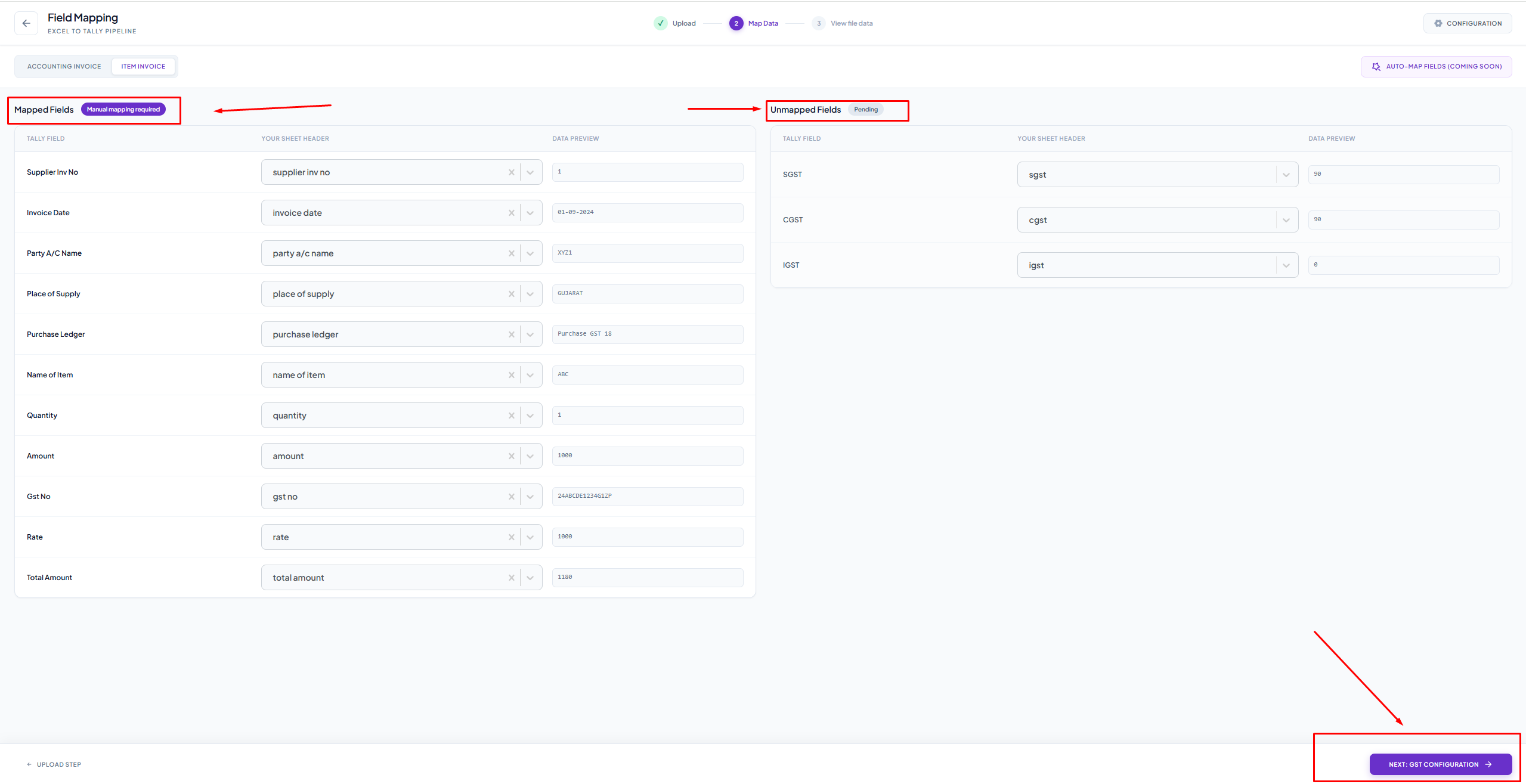
Taxlink imports sales and purchase registers from Excel or CSV into Tally in any column layout. Column headers are matched to Tally fields automatically, CGST, SGST or IGST ledgers are applied by place of supply and round-off is handled before the vouchers are pushed to Tally.
Practices import client sales and purchase registers from Excel into Tally without building XML files or reformatting every sheet to a fixed template.
Used by CAs + Accountants · ₹8,000 + GST/year with every module · Works with your existing Tally
Client's register — as it came
| Inv Dt | Bill No. | Customer | Grand Total |
|---|---|---|---|
| 02-10 | INV-3301 | Krishna Ent. | 15,045 |
| 02-10 | INV-3302 | Patel & Sons | 1,41,600 |
| 03-10 | INV-3303 | Shah Traders | 26,432 |
No template. No reformatting. Upload it exactly as your client sent it.
The problem
What this solves for your practice
Clients send registers in different column orders, with or without items, and with mixed GST treatments. Manual XML conversion or voucher-by-voucher entry slows month-end. Taxlink maps headers to Tally fields, calculates GST by place of supply, and pushes vouchers after review.
How it works
Three steps, start to finish
- 1
Upload the register
Sales or purchase, with or without items, in any column layout.
- 2
Columns map themselves
Headers are matched to Tally fields automatically. You confirm the one or two it couldn't.
- 3
GST handled, vouchers ready
CGST, SGST or IGST by place of supply, plus round-off — then push to Tally.
Full workflow
From upload to Tally — step by step
- 1
Sync masters from Tally
With the Connector running, sync ledgers and stock items so Taxlink knows your chart of accounts before import.
- 2
Choose sales or purchase import
Open Sales or Purchase in Taxlink. Pick accounting invoice or item invoice mode depending on whether lines have stock items and quantities.
- 3
Upload Excel or CSV
Upload the client's register as sent. Taxlink proposes column-to-field mapping; confirm any column it cannot match.
- 4
Validate GST and round-off
CGST, SGST, and IGST ledgers follow place of supply. Round-off is applied before vouchers are created.
- 5
Review and push vouchers
Scan totals and party GSTINs, then push to Tally. Use bulk master upload separately when you only need ledgers or stock items.
Examples
How firms use this in practice
E-commerce seller purchase register
A multi-column Excel with SKU, rate, and IGST is imported as item invoices. Unmapped columns are tied to narration or party fields once.
Service firm sales — accounting invoices
A simple four-column sheet (date, party, amount, GSTIN) imports as accounting invoices without stock lines.
Bulk ledger creation before vouchers
Upload a master sheet with GST applicability and HSN/SAC, create ledgers in bulk, then import the month's sales file.
Supported inputs
Formats and compatibility
- Excel .xls and .xlsx
- CSV UTF-8 exports
- Any column layout — header-based mapping
- Single-line or multi-line invoices per voucher
- Sample files available inside Taxlink for each import type
Limitations to know
- Focused on sales, purchase, and master imports — not a generic arbitrary spreadsheet importer.
- Requires correct party GSTIN and tax type for reliable GST ledger posting.
- Very wide files may need unused columns removed for clearer mapping.
- Pushes to Tally require the Connector and an open company.
Troubleshooting
Common errors and fixes
What's included
Everything you need for this job
- Any column layout — headers auto-mapped to Tally fields
- Accounting invoices and item invoices
- Single-item or multiple-item invoice files
- Local and LUT export sales
- GST auto-calculation with CGST, SGST and IGST ledger mapping
- Automatic round-off
- Ledger and stock item masters in bulk, with GST details
- Sample files to download for every format
Guides
Related articles
FAQ
Common questions
Close books faster. Serve more clients.
Join CAs + Accountants who turned hours of data entry into minutes of review. Every module, ₹8,000 + GST a year — try it free for 7 days.